Thursday, September 27, 2012

Liens pratiques de la semaine

Vous trouverez dans ce billet une s�lection de liens pratiques autour des technologies Java qui m'ont particuli�rement int�ress�es ces derni�res semaines. 

Eclipse
  • Critiques li�es aux performances d'Eclipse JUNO, Mike Milinkovich tente de r�pondre. 
  • Un petit billet de Paul-Emmanuel qui explique comment cr�er un Splash-Screen dynamique.
  • �galement propos�e par Paul-Emmanuel, une s�rie de liens pour conna�tre ce que vos applications RCP consomment en m�moire ou comment activer les logs.
  • Une s�rie de billets (billet 1, billet 2 et billet 3) concernant les sp�cificit�s d'Eclipse 4 (mod�le d'application, injection...).
  • Eclipse Kepler, la prochaine version d'Eclipse, sort en 4.3 Millestone 2 (page des nouveaut�s et page de t�l�chargement).
  • Orion (l'IDE dans le navigateur) sort en 1.0 M2 (page des nouveaut�s et page de t�l�chargement).
Java
  • P6Spy est un proxy de pilote JDBC qui facilite la trace des requ�tes JDBC. Peut s'employer partout o� il est possible de d�finir un driver JDBC (Hibernate...). Ce billet d�taille les grandes lignes.
  • Un billet int�ressant qui montre comment mettre en �uvre du multidispatch en Java.
  • Participer au sondage sur le futur de GWT (�a prend 10 minutes)
Divers
  • D�sireux de conna�tre le jargon des programmeurs (Yoda Conditions, Gotcha...), un billet qui s'y int�resse.
  • Jetstrap un �diteur WYSIWYG pour �diter des pages bas�es sur le CSS Bootstrap.

Sunday, September 9, 2012

Liens pratiques de la semaine

Vous trouverez dans ce billet une s�lection de liens pratiques autour des technologies Java qui m'ont particuli�rement int�ress�es ces derni�res semaines.

Eclipse
  • Opal une biblioth�que de composants pour la plateforme Eclipse. Certains des composants sont un portage de la biblioth�que graphique Swing.
  • Un billet qui explique comment utiliser des biblioth�ques tiers lors d'un d�veloppement Eclipse RCP.
  • Un billet qui explique comment utiliser efficacement les validators de JFace Data Binding.
  • Ce billet d�taille comment utiliser SWT/JFace dans une application qui n'est pas bas�e sur OSGi.
  • Un retour d'exp�rience sur Tycho afin de construire des applications bas�es sur Eclipse.
  • Une astuce qui permet de supprimer les lignes vides des codes Java (id�al pour les monomaniaques).
Java
  • Une analyse sympathique sur le devenir de GWT donn�e par un contributeur Eclipse. Il cite que la d�cision de Google de lib�rer GWT � la communaut� Open Source serait comparable � la d�cision d'IBM d'offrir Eclipse � la communaut� en 2001. GWT connaitra-t-il le m�me succ�s ?
  • Un composant de s�lection pour GWT bas� sur Chosen, un plugin Javascript pour jQuery.
  • Utiliser Bootstrap avec GWT depuis ce projet.
  • Atmosphere, la biblioth�que pour faire du Push Serveur, est disponible en 1.0. Elle propose diff�rents supports (Web Sockets, SSE, Long-Pollings, HTTP-Streaming et JSONP).
  • Un petit billet qui expliquer comment commencer avec Hibernate, c'est toujours pratique d'avoir ce type d'article.
  • f5less permet de reconstruire et recharger une application Web en cours de d�veloppement lorsque vous faites un ctrl + s. N�cessite d'apr�s la documentation, une JVM assez r�cente.
  • L'arriv�e de Jetty 9 est proche, un billet qui explique les impacts n�cessaires (GWT et  GAE devront y passer un jour).
  • Jnario fournit un DSL pour l'�criture de test unitaire. C'est assez sympathique les diff�rents niveaux de langage (de la sp�cification � l'impl�mentation).
  • Un billet qui fait partie d'une s�rie sur Spring Roo. Dans celui-ci il y a une tr�s bonne pr�sentation sur le NoSQL MongoDB orient� document.
Divers
  • Bootstrap 2.1.0 est disponible. Voici la page des nouveaut�s. 
  • USB Disk Access Manager est un utilitaire qui permet de prot�ger ses ports USB.
  • La boite � outils ViewDNS propose des outils concernant la gestion des noms de domaine.
  • Un ensemble d'API en relation avec des services de m�t�o, trouv�e � l'occasion du service Google qui a disparu.
  • Une astuce qui montre comment envoyer automatiquement un email quand un utilisateur se connecte sur une machine Windows.

Wednesday, September 5, 2012

J'ai besoin ... de construire une PirateBox

Suite � un article publi� sur Le Monde, j'ai d�couvert une conf�rence vid�o de Ga�l Musquet donn�e � l'occasion du festival Pas Sage en Seine et qui pr�sentait le principe de la PirateBox. Une PirateBox est un r�seau sans fil, local qui permet d'�changer des fichiers de mani�re anonyme. L'id�e m'est alors venue de cr�er une PirateBox afin de pouvoir partager mes diff�rents outils de d�veloppements pr�f�r�s (Eclipse, Java...). Cela est aussi une occasion de d�couvrir des choses int�ressantes sur l'installation et la configuration d'un syst�me embarqu� comme OpenWRT.

L'objectif de ce billet et donc de vous pr�senter une installation d'une PirateBox. A vrai dire il s'agit d'une installation un peu particuli�re puisqu'elle ne s'est pas d�roul�e correctement. En effet, la mise � jour du firmware du routeur n'a pas r�ussi et j'ai du passer par une communication port s�rie pour r�soudre le probl�me.

Dans le cas o� vous souhaitez des tutoriels plus concis et qui montrent les �tapes pour installer une PirateBox dans les cas classiques, je vous conseille les suivants :
Pour cr�er une PirateBox, j'ai utilis� le mat�riel suivant :
  • Router TP-Link MR3020 V1.7 disponible sur Amazon,
  • Batterie Tecknet 7000 mAh pour �tre autonome au niveau de l'alimentation �lectrique. Pr�voir une capacit� �lev�e pour augmenter la dur�e ~ 14 heures disponible sur Amazon,
  • Cl� USB 32 GO pour stocker les donn�es. Il est possible d'utiliser une disque externe mais il faudra penser � l'alimenter ce qui pourra r�duire consid�rablement l'autonomie de la batterie.

Concernant le mat�riel pour la communication port s�rie, j'y reviendrai plus tard. C'est un passage oblig� s'il ne vous est plus possible de passer par la voie Ethernet.

Au niveau logiciel, j'ai utilis� :
  • Windows 7,
  • Putty pour la communication Telnet, SSH et COM,
  • le firmware OpenWR,
  • le package PirateBox.

Pour les diff�rentes �tapes, je vais suivre un ordre chronologique.

�tape 1 : d�ballage du routeur TP-Link MR3020

Ayant re�u rapidement mon routeur TP-Link MR3020 command� sur Amazon, je d�cide de me lancer dans la cr�ation de ma PirateBox. Premier constat, j'ai l'impression de d�baller un produit Apple (IPod, IPhone). L'emballage est tr�s ressemblant. Le contenu contient un routeur, une alimentation un cable USB et un c�ble Ethernet.
Emballage du TP-Link MR3020
Contenu de l'emballage du TP-Link MR3020

�tape 2 : connexion au routeur TP-Link MR3020

Je m'assure avec tout que l'interrupteur du routeur est en mode "Wisp". Je branche ensuite l'alimentation du routeur via le micro USB vers le port USB de mon portable. De m�me, je branche le c�ble Ethernet du routeur � mon portable. Enfin, je passe en WIFI afin de conserver la connexion internet sur mon portable PC.
Connexion du TP-Link MR3020
Ouvrir l'URL suivante http://192.168.0.254 � partir de n'importe quel navigateur.
Le nom d'utilisateur et le mot de passe sont 'admin'.

�tape 3 : mise � jour du firmware du routeur

Depuis le menu de gauche, choisir l'�l�ment System Tools ;
Choisir alors l'entr�e Firmware Upgrade puis s�lectionner le fichier openwrt-ar71xx-generic-tl-mr3020-v1-squashfs-factory.bin (t�l�charg� ici).
Faire la mise � jour en cliquant sur Upgrade. L'installation va proc�der et aucun message d'erreur ne devrait apparaitre. Il est ensuite indiqu� que le routeur va red�marrer.
Historiquement il ne s'agit pas du m�me fichier que j'avais utilis�. Le pr�c�dent concernait la version 1.6 du routeur et l'installation sur la 1.7 (la version de mon routeur) a abouti � un probl�me d'activation du r�seau. On va donc consid�rer par la suite que le connexion r�seau vers le routeur ne fonctionne pas.

�tape 4 : le blackout, le d�but des probl�mes

Le routeur red�marre et d'apr�s les diff�rents tutoriels que j'ai suivis, l'�tape suivante consistait � se connecter en Telnet au routeur. J'ai utilis� le Telnet de Putty via la configuration suivante :
Configuration Telnet avec Putty
Le probl�me c'est que rien ne se produisait, le routeur ne r�pondait pas. Un test ping pour s'assurer de l'existence d'une connexion active n'a rien donn�. Comme j'�tais en DHCP sur ma configuration r�seau, j'ai configur� en IP fixe pour avoir une classe d'adresses identique au routeur. Cela n'a �galement rien donn�. J'ai d�cid� de rebooter le routeur et r�it�rer les diff�rentes commandes pr�c�dentes, mais pas plus de changement.

J'ai d�couvert sur les diff�rents forums qu'il existait un Safe Mode sur le routeur. Pour l'activer, il faut �teindre le routeur et le rebrancher. D�s que la premi�re LED s'allume, il faut appuyer longtemps sur le seul bouton du routeur. Le r�sultat que vous devez obtenir est que la premi�re LED clignote tr�s rapidement. Mais le Safe Mode n'a rien chang� non plus. A cette �tape, j'ai bien pens� que mon routeur �tait mort.

�tape 5 : les forums PirateBox et le WIKI OpenWRT

Le site PirateBox contient un forum que j'ai parcouru pour tenter de trouver un message qui d�crirait � peu pr�s mon probl�me. C'�tait pas glorieux, il n'y avait pas grand chose. En fait, je me rendais compte que la version du routeur que je poss�dais �tait r�cente. J'ai donc d�cid� apr�s m'�tre assur� que le probl�me n'�tait pas r�solu de poster un message sur ce forum (Cannot connect in telnet after the OpenWRT firmware installation). Apr�s plusieurs All� / Retour sur cette discussion et sur le forum OpenWRT, j'en suis venu � la conclusion que seule une connexion via le port s�rie �tait possible.  

�tape 6 : achat du module s�rie

Depuis le WIKI d'OpenWRT pour le MR3020, une section d�crit comment communiquer via le port s�rie. Il est pr�conis� d�acheter un composant tout pr�t qui permet d'utiliser le port s�rie via une entr�e USB. En fait je ne me sentais pas capable de monter un circuit from scratch. Je me suis donc orient� vers ce module FTDI Basic Breakout - 3.3V. J'ai �galement pris cela pour que les branchements soient plus faciles.

�tape 7 : le bricolage et la soudure

Tout d'abord il faut acc�der � l'int�rieur du routeur. Pour cela il faut vous munir d'un petit pied de biche en plastique et ouvrir le couvercle c�t� LED (vous pouvez essayer avec un tournevis au risque de rayer le plastique).
Outil pour ouvrir le dessus du routeur
Il n'y a aucune vis pour retenir le circuit imprim� du routeur, retirer donc le de son logement en plastique afin de faciliter les op�rations de soudure. 

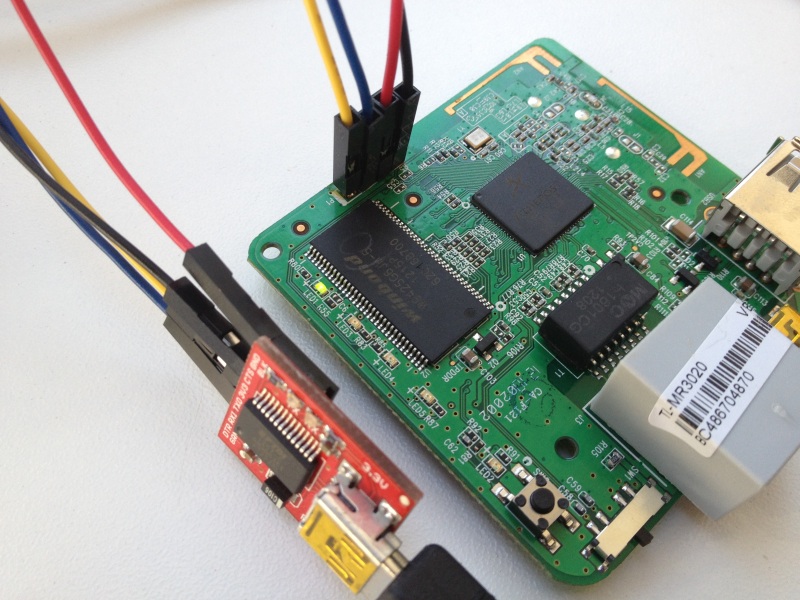
Le port s�rie est identifiable via les quatre petits fiches / trous plac�(e)s en ligne.
Identification des fiches du port s�rie du TP-Link MR3020
Deux solutions s'offraient � moi pour connecter les fils sur le circuit imprim�. La premi�re �tait de d�nuder 4 fils et d'effectuer un point de soudure pour chaque trou. Le probl�me s'est la fragilit� des fils. La seconde s'�tait d'essayer de reproduire une fiche m�le. C'est la seconde solution qui a �t� choisie. 
Pour trouver la bonne taille de connectique, j'ai utilis� des aiguilles � coudre. Pour les points de soudure, faites les par le dessous du circuit imprim�. Vous devriez obtenir le r�sultat suivant. J'ai fait un test au voltm�tre pour m'assurer que les points de soudure �taient correctement r�alis�s.

�tape 8 : connexion via le port s�rie du routeur TP-Link MR3020

Sur le routeur, la premi�re fiche est identifi�e par p1. Les fiches d�signent dans l'ordre :
  • p1 : TX
  • p2 : RX
  • p3 : GND (masse)
  • p4 : VCC
 Sur le module USB/S�rie, le r�le des fiche est directement imprim� :
  •  p1 : GND (masse)
  •  p2 : CTS
  •  p3 : Power 3.3V
  •  p4 : TX
  •  p5 : RX
  •  p6 : DTR  
Naturellement j'ai fait correspondre les TX, RX et GND. Pour le VCC, j'ai branch� l'alimentation. Toutefois, �a ne fonctionnera pas. Suivre alors les modifications suivantes.

Il faut supprimer l'alimentation (VCC) pas de p4 et intervertir TX et RX. Vous obtiendrez le r�sultat suivant :
Connexion TP-Link MR3020 avec le module FTDI Basic Breakout - 3.3V
Il faut ensuite connecter le module USB/S�rie sur votre PC et alimenter le router via le mini USB.
Il faut par ailleurs identifier le port virtuel COM employ� par le module USB/S�rie. Dans mon cas c'�tait le COM5.

Depuis l'application Putty, param�trer les informations afin d'effectuer une connexion en port s�rie en s'assurant que les param�trages suivants sont respect�s :
  • Bits per second: 115200
  • Data bits: 8
  • Stop bits: 1
  • Parity: None
  • Flow control: None
Faire Open, vous devriez maintenant obtenir une communication avec OpenWRT. Si �a ne fonctionne pas assurez-vous que lorsque vous tappotez sur le clavier de votre PC les LED du module USB/S�rie clignotent. V�rifier �galement les points de soudure et contr�ler enfin les branchements.

�tape 9 : mise � jour du firmware

A cette �tape, j'arrive � me connecter au routeur. Je peux parcourir le contenu et m'apercevoir que tout le contenu de l'OpenWRT a l'air correcte. Un reboot du routeur me permet de remarquer que le configuration r�seau pose probl�me. Il fallait donc que je trouve un moyen de mettre � jour ce firmware en m'assurant d'utiliser une version correcte pour mon routeur. J'ai pris le parti d'utiliser une cl� USB et de d�poser le firmware d�zipp� dedans.

Depuis Windows, copier le nouveau firmware d�-zipp� sur une cl�.

Brancher cette cl� sur le routeur et proc�der � son montage
 mount /dev/sda1 /mnt/usb
Copier le firmware dans le r�pertoire /tmp

Ex�cuter cette instruction et attendez que la mise � jour soit termin�e
mtd -r write openwrt-ar71xx-generic-tl-mr3020-v1-squashfs-factory.bin firmware

�tape 10 : installer PirateBox

Pour le reste de l'installation de la PirateBox, je ne vais pas faire un copier/coller des nombreux tutoriels qui existent. Vous pouvez suivre celui-ci qui est tr�s bien fait.

Conclusion

Au d�but de ce challenge, je ne pensais pas qu'il allait m'arriver ce genre de m�saventure. En y r�fl�chissant, je ressentis lors du plantage une certaine frustration du fait que j'avais achet� le routeur et que peut �tre il ne me servirait pas � grand chose. Un peu de patience, des recherches sur Internet, des gens motiv�s et le tour est jou� : j'ai maintenant ma PirateBox.

Monday, August 13, 2012

Thumbnails: Formatting Thumbnails

This article discusses how to tastefully format/decorate a thumbnail. Previous articles discuss how to scale images efficiently, including bmps, jpgs and pngs, and how to extract existing thumbnails from large jpg images, but this article focuses on the question: and then what?

Context

Why do we need to decorate thumbnails? We don't need to, I guess. This is a matter of taste. For comparison, here are a few examples of what other people are doing:

Mac OS Finder

This is a set of thumbnails when I browse a folder of images in the Finder on Mac 10.7. This is one of the most complicated formatting I've found: it includes a shadow, a white border, and then a thin dark border.

iTunes

In iTunes: the thumbnails only have a light shadow.

Here you might be able to make more assumptions about the content of the thumbnail: it is probably a very brightly colored image with lots of eye-catching patterns and texture. (That is: an artist specifically composed this thumbnail to fill every pixel.)

Woot.com

Woot.com doesn't bother with shadows, but they still add some very distinct borders around certain thumbnails.

In this case: the borders help identify what is the "clickable area" for these thumbnails.

Amazon

These non-rectangular thumbnails from Amazon.com have no shadows or borders at all.

These are also the largest thumbnails in this set of examples: they occupy so much space that they are visually distinct without any help from formatting.

Microsoft.com also appears to follow this model (using large, undecorated thumbnails).

The decision regarding when and how to decorate a thumbnail might be better left to graphic designers than to software engineers, but for now my point is simply: this is an established convention that you may sometimes want to follow.

Overview

My most immediate goal is to create a file browsing UI, so I want to emulate the first example shown above: photo thumbnails in the Mac Finder. There are three basic elements in this image: the drop shadow, the border, and the thumbnail itself.

This applet demonstrates these 3 layers:

This jar (including source code) is available here.

This applet demonstrates the BasicThumbnail class and its ability to format a thumbnail image. The default options displayed are the preset options that resemble the Mac OS thumbnail (simply referred to by the static field BasicThumbnail.Aqua).

Each layer of the thumbnail (shadow, border, image) is a separate object with its own concept of padding (insets). They are painted in the order shown in the list (from left to right), so that each layer overlaps all the previous layers. To modify a layer: click that layer in the list and use the controls in the inspector.

All layers support varying amounts of curvature for the corners. A curvature of zero is a sharp (rectangular) corner, and a high curvature is a very rounded corner.

Shadow

In this model a shadow is just a series of strokes of increasing thickness. (That is: a shadow of 1 pixel, then 3 pixels, then 5 pixels, etc.) Each stroke is solid black with a very light opacity (usually less than 20 out of 255).

Since this can be several pixels thick: you have control of both the inner and outer curvature.

Border

A border is a solid-color frame. Technically this can use any color, but the UI here restricts it to a shade of gray for simplicity's sake. Like the shadow: this supports an inner and outer curvature.

Image

This layer contains the actual thumbnail. It also contains an optional background color, and one curvature control to apply rounded edges.

In the applet above: selecting the image layer lets you control the rotation. The rotation is technically a property of the entire BasicThumbnail (it applies to all layers), however it was placed in the image's inspector for convenience when modeling the GUI.

Layer Controls

The top row of the applet contains a set of buttons to add, remove, and reorder layers. Also the "<>" button displays the source code used to represent the thumbnail in the editor.

Usage & Implementation

Once a BasicThumbnail is constructed, you can simply call:

BufferedImage img = thumbnail.create( sourceImage, maxSize);

Where "sourceImage" is an Image, URL, or File, and "maxSize" is a java.awt.Dimension object. The returned thumbnail will be either the width or height of the argument dimensions, with the other dimension scaled proportionately as needed.

The actual scaling is handled abstract by the parent class Thumbnail: this is where the logic lives that accepts a file, URL or image and scales it. The subclasses (such as the BasicThumbnail) are responsible for calculating exactly what dimensions to scale the source to, and then how to render that scaled image.

If a rotation has been supplied: then a binary search is used to calculate the exact scaling factor required to fit the source image inside the thumbnail with all the specified decorations.

Conclusion

My final thumbnail formatting is not a perfect replica of Apple's formatting, but it is sufficiently close for my needs. (Also Apple can modify this formatting at any time, so maintaining an exact copy is a very ambitious ideal.) What I have now is a strong improvement over a plain (undecorated) thumbnail, so I am happy with the result.

I encountered a few thorny issues along the way; the main two both had to do with adding rotation, and subtle rendering bugs I had to hunt down. In hindsight the rotation feature may have been more trouble than it was worth, but I'm happy with the finished result.

This applet has a more carefully crafted UI than usual. This has the unfortunate side-effect of bloating the jar's file size (because it includes the UI for the angle dial, the grayscale slider, and the pixel-magnification-panel, among other things)... but I think this bloat is worth it: this applet generates copy-and-paste-able code! On a personal/selfish level: practicing UI design here is very useful, even if it comes at a cost of inconveniencing other developers with a larger jar than necessary.

Most aesthetic layouts probably only contain only 1 or 2 layers. Maybe 3. So I have mixed feelings about this applet starting out with a 5-layer demo. This complicated demo is probably the exception rather than the rule, but I wanted to demonstrate what this architecture is capable of. In most cases, though: you probably only need about 2 layers to make a subtle-but-significant improvement in appearance.

Sunday, August 12, 2012

Liens pratiques de la semaine

Vous trouverez dans ce billet une s�lection de liens pratiques autour des technologies Java qui m'ont particuli�rement int�ress�es ces derni�res semaines.    

Java
  • La version GWT 2.5 est disponible depuis un peu plus d'1 mois d�j� (enfin non, pour l'instant il s'agit d'une RC). Les nouveaut�s se trouvent essentiellement au niveau de la performance. On notera entre autre la pr�sence d'un mode Super Dev qui se veut �tre beaucoup plus rapide. Un article sur le mode Super Dev est disponible ici.
  • Jigsaw l'extension cens�e ajouter la notion de module a Java ne sera finalement pas disponible dans la prochaine version de Java 8 (source)
  • Un article technique int�ressant concernant un r�capitulatif sur les Closures (appel�es �galement Lambda) de la prochaine version de Java (Java 8)
  • Deux articles int�ressants sur le NoSQL Hadoop. Le premier d�crit de mani�re tr�s simple le principe de Map Reduce. Le second explique comment cr�er un pont entre Hadoop et l'outil de reporting Birt. A noter que le sous projet Hive (un entrep�t de donn�es pour Hadoop) est utilis� pour exploiter le langage de requ�te HadoopQL.
  • Un billet qui montre comment cr�er un ex�cutable Windows en utilisant Maven.
Eclipse
  • Deux tutoriels (lien 1 et lien 2) concernant le projet Eclipse Graphiti dont l'objectif est de facilement construire un �diteur de mod�les.
  • Lars Vogel vient de publier un article sur Tycho.
  • Un site qui propose des th�mes pour Eclipse quelle que soit la version. Depuis Eclipse 4 qui tente de rendre plus accessible la customisation des interfaces graphiques, � mon avis il va y avoir de plus en plus de th�mes.

Thursday, July 5, 2012

Eclipse Juno est disponible, d�tail des nouveaut�s

Depuis le 27 juin dernier, la fondation Eclipse a sorti une nouvelle version d'Eclipse dont le nom est Eclipse Juno.

Au niveau des nouveaut�s :
  • Eclipse 4.2 : le num�ro de version est maintenant 4.2. La compatibilit� est assur�e avec la version 3.x.
  • Code Recommanders : un plugin qui assiste le d�veloppeur a anticip� son d�veloppement.
  • Am�lioration sur le JDT : meilleur support pour Java 7, support du catch multiple...
  • Virgo : un projet qui embarque un noyau Nano pour cr�er de petites applications web bas�es sur OSGi.
  • Xtext / Xtend : support du d�bogage int�gr� des DSLs.
  • Orion : l'IDE dans le navigateur.
  • eGIT : am�lioration du client pour l'outil de gestion de sources GIT.
  • RAP : am�lioration de la plateforme permettant de faire du RCP pour le Web.
  • Koneki : projet qui fournit un IDE pour Lua un langage de script historiquement utilis� pour les jeux vid�os et qui est maintenant employ� dans le syst�me M2M (Machine vers Machine).
Pour des d�tails suppl�mentaires sur la sortie d'Eclipse Juno vous pouvez utiliser ces liens
Pour t�l�charger cette nouvelle version, rendez-vous sur le site de la fondation et choisissez votre distribution :

Tuesday, July 3, 2012

Lists: An Observable List for UIs

This article discusses combining the java.util.List interface with the javax.swing.ListModel interface. That is: suppose you want a list that you can easily interact with, but also that plugs into UI elements.

The Simple Solution

The simplest solution is to implement these two interfaces in one object:

public class MyList implements java.util.List, javax.swing.ListModel {
...
}

Several years ago I wrote the WatchableVector with this approach in mind: this class extends the java.util.Stack, so all the data structure logic is built-in. All this class has to do is add support for the listeners.

This list can be plugged directly into a JList, and at the same time you can treat it like it a traditional java.util.List. For example, now if you call java.util.Collections.sort( myList ), the UI will automatically update.

Shortcomings

After working with this class for several years, I started to identify shortcomings in this implementation:

  • Recursive Listeners. In theory a a observable/observer contract is simple: when a change occurs, then notify the listeners. But in the world of UI: it is my experience that listeners spiral out of control very quickly. Here is a simplified/approximated stack trace diagram of a potential listener problem:

    Here the list is represented in blue, and two separate listeners are represented in orange and green. The first listener (orange) is notified that a new file is added to a list, but it knows the list needs to always be alphabetized: so it resorts the list. This ends up triggering the first (orange) listener a second time before the second (green) listener ever hears about the first event. If the second listener actually listens to the described event: it will be confused that elements are being reordered that it doesn't even know exist yet.

    This is a contrived example showing a simplified chain reaction. In the real world the first listener might have interacted with a separate data structure, and that structure interacted with another, and another, and as a result: a series of listeners that seemed minimally simple (even elegant?) on paper turn into a nightmare of events. I refer to this as "cascading listeners", but a coworker refers to it as "listener hell".

  • The Event Dispatch Thread. My ListModel is plugged into a Swing component: so it needs to only ever be updated on the event dispatch thread. But my List is the same as my ListModel: so complex (potentially time-consuming) operations on my list now need to occur on the EDT, or ambiguous "bad things" may happen (in a hard-to-pin-down kind of way).
  • Multithreading. Consider the illustrated example above: all this is occurring in the event dispatch thread. What happens if another thread wants to access this list? It has to wait, because the call to WatchableVector.add(..) is synchronized, as is the call the WatchableVector.get(index). The operation itself may be relatively fast, but the synchronization lock isn't released until all the listeners have been notified. (Including the potentially recursive listener chain reactions...). If you think of this as an IO-model: there's no reason other threads have to wait to read data from this list while other listeners spin their wheels -- but we should prevent them from write operations.
  • This weekend I wrote a new class to address these issues: the ObservableList.

    Addressing Listener Recursion

    The ObservableList continues to support the ListDataListener, but it separates listeners into two categories: synchronized and unsynchronized.

  • Synchronized Listeners. These listeners are not allowed to modify the list. Because of this contract: it is guaranteed that the ListDataEvent each synchronized listener receives reflects the current state of the list. If both listeners in the previous example were added as synchronized listeners, then the flow of execution will look like the diagram on the right.

    Even if the first listener doesn't catch the RecursiveListenerModificationException: the loop that iterates over the listeners will catch it and call e.printStackTrace(), so all the subsequent listeners are guaranteed to carry on as usual.

    The downside of this approach is: in a complex environment calls that modify this list should be wrapped with a try/catch clause to catch potential RecursiveListenerModificationExceptions. This will be easy to forget. Hopefully violations will be consistent and easy to identify early in testing. But the positive side is: all the other listeners are protected.

  • Unsynchronized Listeners. These listeners are allowed to modify the source list, so when you use an unsynchronized listener: you have to accept that the ListDataEvent you receive may be inaccurate. (For example: you may be notified that an element was removed, but in fact a previous listener re-added it! You'll receive that event, too, but probably not in the order you would expect.)
  • You have the option when adding an unsynchronized listener to also prohibit modification from within that thread. This is intended largely as a safeguard for developers to detect unintended chain reactions.

    Addressing Synchronization

    My original data structure relied on the synchronized keyword to protect the integrity of the list. But it also kept listener notification inside the synchronization block, so if one thread made a call to modify the list and a second thread later wanted to read from the list: then the second thread could not obtain the synchronization lock until all the listeners had completed.

    Here is a crude sequence diagram of what that would look like:

    When working with complicated UI elements: sometimes listeners (especially a chain reaction of listeners) can involve very expensive operations. We're blocking thread #2 for no real reason: the actual doAdd() operation is complete, so the list is stable again.

    The ObservableList uses Semaphores and not the synchronized keyword. The basic format for all operations that modify the list resemble this:

    public Object execute(...) {
    readSemaphore.acquireUninterruptibly( 1 );
    try {
    [ evaluate if this is a null-op, if so: return ]
    readSemaphore.acquireUninterruptibly( MAX-1 );
    try {
    [ do operation ]
    } finally {
    readSemaphore.release( MAX-1 );
    }
    fireSynchronizedEvent(...);
    } finally {
    readSemaphore.release();
    }
    fireUnsynchronizedEvent(...);
    return returnValue;
    }

    And the format for all operations that retrieve (but do not modify) data from this list resemble:

    public Object getSomething() {
    readSemaphore.acquireUninterruptibly();
    try {
    return returnValue;
    } finally {
    readSemaphore.release();
    }
    }

    Since we already (separately) established that a synchronized listener is forbidden to further modify this list: this provides a safe model for concurrent read operations on this list (including while listeners are being notified). The sequence diagram for the previous example now looks like this:

    Now suppose thread #2 is the event dispatch thread, and one of the listeners in thread #1 called: SwingUtilities.invokeAndWait(..). (That is: thread #1 is forcing something to run on the EDT.) In the first model using the synchronized keyword: you will have a deadlock. The EDT is waiting to synchronize against the list, and the thread with that lock is waiting for the EDT. In the second model: there is no deadlock.

    Addressing The Event Dispatch Thread

    There's probably a reason the java.util.List and javax.swing.ListModel were kept separate: when one class implements both, it's very tempting to forget that object (which may have been pledged to the UI) should never be modified on different threads.

    So the ObservableList is designated only as List and not a ListModel. But it has two methods to help UI development:

  • getListModelEDTMirror(): this returns a separate object that mirrors this list. This object will only be updated in the EDT.

    As a result: it may (briefly) be the case that the UI mirror has outdated information, so just because you remove an element from this list doesn't mean it's safe to completely dispose of it. Also if the original list is several thousand elements long: maintaining a copy may be expensive.

  • getListModelView(): this returns a ListModel with direct access to the parent ObservableList. This is basically the "old-fashioned" solution I previously described. If you use this method: it is your responsibility to only ever modify the ObservableList in the EDT. In most cases: you should not rely on this method, but in some (simple) cases it may be safe.
  • Other Convenient Features

    Here are a few additional features the ObservableList list offers:

  • Detailed events. The ListDataEvent involves specific list indices to describe operations that occurred.

    However sometimes calculating a precise event to describe an operation is as expensive as the operation itself, and sometimes your listener really doesn't care about specific indices.

    When you add a listener: you pass an argument indicating whether you want a high level of detail or not. If none of the registered listeners have asked for a high level of detail (or if there simply are no listeners): then an oversimplified CONTENTS_CHANGED events may be used to save time.

  • ChangeListeners. If you aren't really interested in specifics about ListDataEvents, then it can be cumbersome to add the 3 methods of a ListDataListener. You can instead add a ChangeListener: it has only one method to implement.
  • The setAll( List ) Method. This is equivalent to calling list.clear() followed by list.addAll( otherList ). However those calls will trigger 2 listener notifications indicating that everything has changed, when it might be the case that a single ListDataEvent.INTERVAL_ADDED event is needed because only 1 element was added. In short: this method can streamline the notifications the listeners receive.
  • Supplemental Methods with Argument Arrays. Every method that takes a java.util.Collection or java.util.List as an argument now has a supplemental method that accepts an array of elements.
  • Delegating to an Abstract List. The ObservableList wraps around another java.util.List object. The default constructor creates an ArrayList underneath, but you're welcome to use any other list you prefer.
  • Conclusion

    Usually I try to include an applet with my blog articles to keep your attention, but that really isn't possible with this project. Instead all I can link to this time is the ObservableList itself and the related unit tests.

    After years of dealing with (self-inflicted) lessons learned from UI development: I think this list implementation satisfies the need for listeners with safety and efficiency.

    Of course I'm not the first person to work on an observable list. Here are some other related efforts that might suit your needs better:

  • There is an Apache version of the ObservableList, but as far as I can tell it's not optimized for multithreading/safety.
  • JavaFX has its own ObservableList. They also have a setAll(..) method. (In fact my original implementation named this method "replaceAll(..)", and I changed it based on their example.) But I don't have access to the source for this implementation, so I don't know how optimized it is. Also I don't want to start bundling parts of JavaFX in my apps yet.
  • The JDesktop project has a static method: ObservableCollections.observableList(java.util.List list). But this implementation does not have a setAll(..) method, and I'm unclear how this is implemented under the hood.
  • One thing all these approaches do that I appreciate is: they use their own (new) type of listener. The ListDataListener can be a little bit constraining sometimes. (For example: try to describe a List.retainAll( Collection ) operation in terms of a ListDataEvent.) But this listener is how the javax.swing.JList wants to be communicated with, so it's acceptable for my usage.