Friday, May 30, 2008

Acc�l�rez l'ouverture de vos PDF avec Foxit reader


Traditionnellement, le logiciel install� sur son PC pour lire et g�rer les documents PDF est Adobe Reader. Mais Adobe Reader est devenu au fil du temps une usine � gaz, et prend d�sormais 136 Mo de disque dur . Il est bard� de fonctions inutiles qui l'alourdissent et ralentissent grandement son fonctionnement, et ainsi l'ouverture des fichiers PDF.

L' alternative gratuite et ultra-l�g�re � Adobe Reader est Foxit Reader, logiciel d�velopp� par Foxit Software, et qui ne prend que 6.64 Mo d' espace disque !

Pour remplacer Adobe Reader par Foxit Reader, commencez par d�sinstaller Adobe Reader, puis t�l�chargez Foxit Reader :

bouton

Une fois le fichier t�l�charg�, proc�dez � l' installation et, � la derni�re �tape, cochez "Run Foxit Reader", puis cliquez sur Finish.

Foxit Reader s' ouvre alors :

Foxit

Vous pouvez constater que l' interface comporte deux inconv�nients majeurs : elle est en Anglais et une publicit� est pr�sente en haut � gauche.

Fort heureusement, il est possible de corriger ces deux d�fauts en un tournemain.

Traduire l' interface en Fran�ais :

Allez dans Language -> French. Une bo�te de dialogue vous invite � t�l�charger un fichier ("lang_fr_fr.xml"). Acceptez.

Le Foxit Reader Update Manager s' ouvre alors :

2008-05-31_121516

Cliquez sur Download. Le t�l�chargement du fichier est presque instantan� sur une connexion haut d�bit. Cliquez ensuite sur Done. L' interface est maintenant traduite en fran�ais.

Occupons-nous maintenant du bandeau publicitaire :

2008-05-31_121833

Pour retirer cette publicit�, allez simplement dans Affichage, et cliquez sur Publicit� :

2008-05-31_122200

Voila ! Vous voila aux commandes d' un lecteur PDF ultra -l�ger (seulement 8 Mo de m�moire vive lorsqu' il est ouvert), ultra-rapide et enti�rement fonctionnel !

Enjoy !


Monday, May 26, 2008

D�bloquer ses fichiers et dossiers r�calcitrants avec Unlocker

Il vous est d�j� arrive d' avoir affaire � un dossier ou un fichier impossible � supprimer, renommer ou deplacer, sous pr�texte que celui-ci est utilise, alors qu' aucune de vos applications ouvertes ne l' utilise actuellement ?

2008-05-03_212658

Unlocker est la solution � ce probl�me. Ce logiciel permet, via le menu contextuel de d�bloquer tout fichier ou dossier r�calcitrant, et ce tr�s simplement.

Commencez par t�l�charger le fichier d' installation ici :

bouton-r

Ensuite installez le logiciel. Une fois install�, le logiciel a pris place dans le menu contextuel de tous les fichiers et dossiers :

Menu contextuel - Unlocker

Maintenant, lorsque vous serez confront�s � un fichier ou dossier bloqu�, faites un clic droit sur ce dernier, et cliquez sur Unlocker :

Une fen�tre de ce type appara�tra, indiquant le processus qui occupe le fichier :

2008-05-27_165404

Elle permet de d�bloquer le fichier, de fermer le processus qui l'occupe, mais aussi de renommer, effacer, d�placer ou copier le fichier, via le menu d�roulant sur la droite :

Menu d�roulant

Enjoy !


Tuesday, May 20, 2008

Acc�l�rer les acc�s au disque en d�sactivant la mise � jour du dernier acc�s

Windows XP met � jour la date et l' heure de dernier acc�s de tous les fichiers d�s que vous ou un programme quelconque y acc�dez. C'est absolument inutile et cela ralentit grandement l' acc�s au disque dur :


Pour d�sactiver cette fonction aussi futile que g�nante, allez dans D�marrer -> Ex�cuter -> Tapez "regedit".

Dans la fen�tre qui s' ouvre, d�veloppez les branches comme indiqu� :

HKEY_LOCAL_MACHINE -> SYSTEM -> CurrentControlSet

->Control -> FileSystem


Regedit


Une fois que vous vous y trouvez, cr�ez une nouvelle cl� en faisant un clic droit dans une zone libre, allez dans nouveau -> valeur DWORD :

2008-05-20_190642

Nommez la valeur NtfsDisableLastAccessUpdate :


2008-05-20_191819

Ensuite, double-cliquez sur la valeur que vous voulez cr�er et entrez la valeur 1 (en hexad�cimal) :

2008-05-20_192634

C' est fait ! Il vous suffit de red�marrer maintenant pour que les changement prennent effet ...

Wednesday, June 7, 2006

Play Online Thambola . Housie . Bingo !!!!!!!

This site has been moved to http://www.99applications.com
To download code/application click the following link 99applications.com/java_programs and you can also find many c and c plus plus common programs in C & C++ section


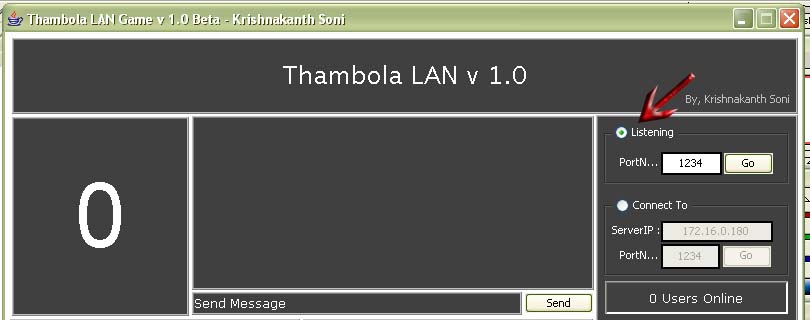
Thambola LAN v 1.0


Figure 00 ( Basic Interface)

This is Online Thambola LAN/Internet Game. Its a multiplayer game. This application can be used as a "Server" or "Client".

Download your application according to your Operating System..

Download Thambola Windows Application
Download Thambola Windows Command Line Application
Download Thambola Linux Application
Download Thambola Solaris Application
Download Thambola JAR File

Note: To Run the Application make sure that Your system contains Java Runtime Environment.
Use WinRAR to unzip the downloaded file.

About ThambolaLAN Application:

This application is based on the original Thambola Game often called Housie, Bingo and many more. In Thambola Game, one person will draw the numbers and announce, similarily here one person will host the game and all the others will join the game. Each person can draw a maximum of 3 tickets from server( host ). When ever the server starts the game, clients will be getting the number on his screen.

Instructions on how to play:

Figure 01: Server Interface

  • After downloading the application. unzip it using winRAR.
  • Open the Application
  • To make the Application as Server or Hosting the Game:
    • Click on the Listening( Located at top-right corner ) and then Specify a Port to Listen on. See figure one
Figure 01: Listen and Connect To

    • Click on GO
    • If it is successfull then new Window will open (ServerStatistics) as shown in figure two.

Figure 02: Server Statistics

    • In Server Statistics Specify the number of tickets you want to generate for the game Click on Generate Game, It may take some time if you specify more number of tickets
    • After Generating the game, You can set a timer to start the game or you can start the game immediately
    • Server will start sending the numbers to clients connected
    • To view the finished numbers click on the View Finished Numbers on ServerStatistics Window.

Figure 03: View Numbers Generated

  • To make the application as Client:
    • Click on the Connect to and specify the serverIP and the server port number on the top right corner, and click on GO
    • If there is some server running you will be connected else it will return an error
    • Submit number of tickets you want. "ONE", "TWO" or "THREE"
    • When the game starts you can view the number on CallerBoard
    • Just click on the number, if u got the number. It will be highlighted
    • When you complete First Line or Second Line or Third Line then submit it by clicking the appropriate option on the ticket
    • Ticket will be validated by the server and result will be announced in MessageBox


Figure 04: Client Interface

feedback.javasourcecode@gmail.com with Subject Line as Thambola:Feedback

bugs.javasourcecode@gmail.com with Subject Line as THAMBOLA: Bugs

download.javasourcecode@gmail.com with Subject Line as THAMBOLA: Code Download

Mail this Page to Your Friend click here

Stay tuned with this Site to get Lots of updates on this application


Tuesday, April 4, 2006

New Clock Field in Java !!

This site has been moved to http://www.99applications.com
To download code/application click the following link 99applications.com/java_programs and you can also find many c and c plus plus common programs in C & C++ section


Visit http://freesourcecode.blogspot.com for more programmes like, Thambola, Housie, Love Calculator, Friendship Calculator, FLAMES, Animations, Digital Number, Sudoku.java, Clock Field. - Java.


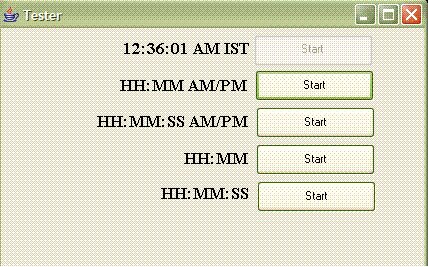
This is new Java Field just like other, TextField, labels or any UI objects. This Clock field extends the JLabel component and has all the functionality of a label with added functionality of displaying the time in different fashions like

HH:MM:SS AM/PM LOCALE
HH:MM AM/PM
HH:MM:SS AM/PM
HH:MM ( 24hr Clock )
HH:MM:SS ( 24hr Clock with Seconds )

As it is extended from JLabel, we can change the font, size of the label, background, foreground and etc. etc.

Its usage is also very simple like JLabel, creating an object of ClockField and adding it to the Panel in the UI, and setting its bounds ( to place it at our convinient place ).

To start the clock tickering, just call the function "showClock" of ClockField.

Now it Starts...

Download the ClockField.java and Test.java Source code for free here..

To Test the Program, Read the ReadMe.txt given with Sourcecode.

Below are some screen shots depicting the above explanation :P

Different Clock Styles
HH:MM:SS AM/PM LOCALE Started.All Different Styles of Displaying Started...

Give Feedback for Improvement.

Friday, March 24, 2006

Housie, Tambola, Bingo Source Code - ( Digitalized )

This site has been moved to http://www.99applications.com
To download code/application click the following link 99applications.com/java_programs and you can also find many c and c plus plus common programs in C & C++ section


Housie is a gambling game played in New Zealand, Australia, and Northern Britain (Southern Britain call it Bingo), where players mark off numbers on a ticket as they are randomly called out. It is very similar to the American game Bingo, however the tickets and the calling are slightly different.

A typical housie ticket is shown to the right. It contains fifteen numbers, arranged in nine columns by three rows. Each column contains either one, two, or very rarely three, numbers. The first column contains numbers from 1 to 9, the second column numbers from 11 to 19, the third 20 to 29 and so on up until the last column, which contains numbers from 80 to 90, the 90 being placed in this column as well). When players first come to the venue (often a church hall, rugby club or other place with sufficient tables and chairs) they must buy tickets or book of tickets. A book usually contains fifty tickets which are played over the course of the night. Players generally play between one and six books. At many venues, special "Super Housie" tickets, usually with much larger prizes, are also played at various times throughout the session. The game is presided over by a caller, whose job it is to call out the numbers and check winning tickets. He will announce the prize or prizes for each game before starting. The two ways of winning a prize are:
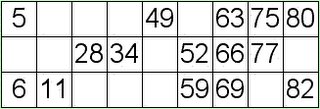
  • Full House - covering all fifteen numbers on the card.
  • Line - covering a horizontal line of five numbers on the card. In bonus (Super Housie) games, often three lines may be claimed - top, middle and bottom.

The caller will then say "Eyes down" to indicate that he is about to start. He then begins to call numbers as they are randomly selected, either by an electronic device or by drawing counters from a bag. The calling is generally very fast, with generally one number called per second, can be customized ( 5 seconds ).

As each number is called, players check to see if that number appears on their tickets. If it does, they will mark it.When all the numbers required to win a prize have been marked off, the player calls out "Line" or "House" depending on the prize, and an official will come and call out the numbers on the ticket. The caller will check to see if each number has been called, and if it has, he will say "House correct - please pay out". if not correct, he will say "Bogus..", and ticket is no more useful.

Business of Housie:

In New Zealand and Australia, housie is often used a fundraiser by churches, sports teams, and other groups, and raffles are sold before the game.

Housie or Bingo is an expanding and highly profitable business in the UK, with many companies competing for the customers' money.

These been.

  • Gala Bingo Clubs
  • Mecca Bingo Clubs

As well as offering the familiar Housie/Bingo played by marking numbered books, most large clubs have their tables modified for the playing of cash housie. (Coin slots.) This is highly profitable for the operator, with a typical "take" of fifty percent of the stake.

Caller Slang:

When calling, the caller will usually say both digits on their own first, and then the number itself, for example, three-two, thirty-two. Some callers will use many of these slang terms, others just a few. However, "Kelly's Eye", "Legs Eleven" and "Top of the Shop" are often used, even if none of the others are.

  • Number 1 is "Kelly's Eye".
  • A number between 1 and 9 is called "Number 1, on it's own".
  • Number 10 is "One-oh, Dowling Street".
  • Number 11 is "All the ones, legs eleven".
  • Number 12 is "One-two, just the doz".
  • Any number ending in a zero (20, 30, 40 etc) is called "Two-oh, blind twenty".
  • Any number consisting of two identical numerals (22, 33, 44 etc) is "Twenty-two, all the twos".
  • Number 45 is "Halfway there".
  • Number 69 is "Dinner For Two Sixty Nine"
  • Number 88 is "Two Fat Ladies Eighty Eight
  • Number 90 is "Top of the Shop".
Reference: http://en.wikipedia.org/wiki/Housie

Now, my Work of Getting Housie Going:

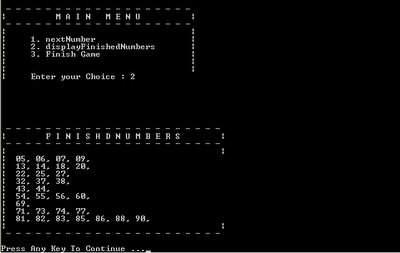
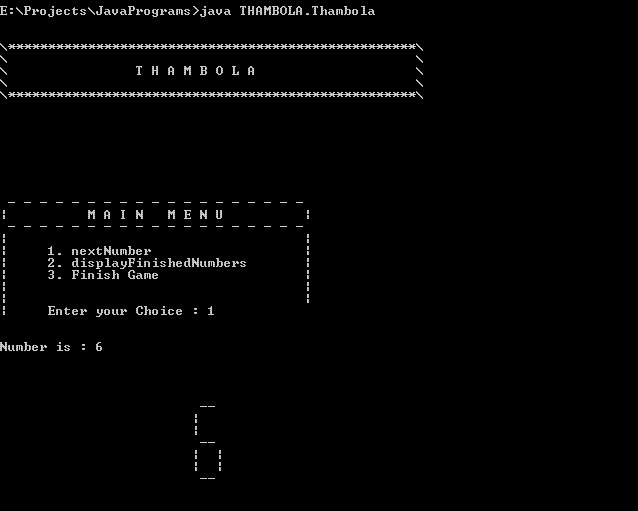
Following are some of the outputs of the Thamboa Program, Have a look of it...

Download Free Java Source Code For Thambola here....

Caller's Board

Displaying Finished Numbers

Generating Tickets

Currently working on making this Thambola Game available online ...


Give feedback to improve :)

http://free-source-code.blogspot.com

Monday, March 13, 2006

The Love Calculator !!!!

This site has been moved to http://www.99applications.com
To download code/application click the following link 99applications.com/java_programs and you can also find many c and c plus plus common programs in C & C++ section


Welcome to this great invention of Doctor Love!

We all know that a name can tell a lot about a person. Names are not randomly chosen: they all have a meaning.
Doctor Love knew this so he made another great invention just for the lonely you!

Sometimes you'd like to know if a relationship with someone could work out. Therefore Doctor Love himself designed this great machine for you. With The Love Calculator you can calculate the probability of a successful relationship between two people. The Love Calculator is an affective way to get an impression of what the chances are on a relationship between two people.

This is just a fun application. Dont take it seriously.

Note: This is a funny logic in this testing if this example has caused any problems, please excuse me its only meant for fun!

Download API & Java Source Code For Love Calc here....

/**************************************************************************/
Java Program - Love Calculator
Author@ Krishnakanth Soni
Feedback@ sonikrishnakanth@gmail.com

Usage: java Love rama sita
/**************************************************************************/

import java.util.*;

class Love
{
private String name1;
private String name2;

public void setFirstName( String name1 ){
this.name1 = name1.toUpperCase();
}

public void setSecondName( String name2 ){
this.name2 = name2.toUpperCase();
}

public void setNames( String name1, String name2 ){
this.name1 = name1.toUpperCase();
this.name2 = name2.toUpperCase();
}

private Vector getCount(){
Vector list = new Vector();
String love = "LOVE";
String name1 = this.name1;
String name2 = this.name2;
for( int i=0; i<name1.length(); i++ ){
String temp = name1.charAt(i) + "";

if( list.contains(temp) ){
int indexOfElement = list.indexOf( temp );
int prevCount = Integer.parseInt( list.get(++indexOfElement).toString() );
prevCount++;
String newCount = (prevCount) + "";
list.set( indexOfElement, newCount );
continue;
}

list.add( temp );
list.add( "1" );
}

for( int i=0; i<name2.length(); i++ ){
String temp = name2.charAt(i) + "";

if( list.contains(temp) ){
int indexOfElement = list.indexOf( temp );
int prevCount = Integer.parseInt( list.get(++indexOfElement).toString() );
prevCount++;
String newCount = (prevCount) + "";
list.set( indexOfElement, newCount );
continue;
}

list.add( temp );
list.add( "1" );
}

for( int i=0; i<love.length(); i++ ){
String temp = love.charAt(i) + "";

if( list.contains(temp) ){
int indexOfElement = list.indexOf( temp );
int prevCount = Integer.parseInt( list.get(++indexOfElement).toString() );
prevCount++;
String newCount = (prevCount) + "";
list.set( indexOfElement, newCount );
continue;
}

list.add( temp );
list.add( "1" );
}

Vector result = new Vector();

for( int i=1; i<list.size(); i+=2 ){
result.add( list.get(i) );
}

//System.out.println( result );
return result;
}

public int getLovePer(){
Vector count = getCount();
if( count.size() == 1 ){
String result = count.get(0).toString() + "";
return Integer.parseInt(result);
}

if( count.size() == 2 ){
String result = count.get(0).toString() + count.get(1).toString();
return Integer.parseInt(result);
}

do{
Vector sub = new Vector();
int size = count.size() / 2;
//System.out.println( count.size() / 2 );
for( int i=0; i<size; i++ ){
String newC = ( Integer.parseInt( count.get(i).toString() ) + Integer.parseInt( count.get( count.size() - 1 - i ).toString() ) ) + "";

if( newC.length() == 2 )
{
sub.add( (newC.charAt(0) + "") );
sub.add( (newC.charAt(1) + "") );
}else{
sub.add( newC );
}
}

if( (size*2) != count.size() )
sub.add( count.get(size) );

count = new Vector();
count = sub;
//System.out.println( count );
}while( count.size() != 2 );

String result = count.get(0).toString() + count.get(1).toString();
return Integer.parseInt(result);
}

public int getLovePer( String name1, String name2 ){
String temp1 = this.name1;
String temp2 = this.name2;

setNames( name1, name2 );
int lPercentage = getLovePer();
setNames( temp1, temp2 );

return lPercentage;
}

public String toString(){
String result = "[ Love Percentage Between " + this.name1 + " And " + this.name2 + " is " + getLovePer() + "% ]";
return result;
}

public static void main(String[] args)
{
//System.out.println("Hello World!");
Love love = new Love();
if( args.length == 2 ){
love.setNames( args[0], args[1] );
System.out.println( "\n" + love + "\n" );
System.exit(0);
}else{
System.out.println( "\nUse With Proper usage, Find a sample FREINDSHIP Below\n java FriendShip name1 name2 \n" );
}
love.setNames( "krishna", "radha" );
System.out.println( "\n" + love + "\n" );
}
}